For AUTO, optimizing throughput required:
- maximum flexibility to match what our alliance partner can do
- dynamically calculated optimal pathing for the chosen AUTO sequence
- Reserving the last 0.5 seconds of AUTO to exit the launch area and secure a MOVEMENT RP.
To address flexibility, we came up with an interpretable pseudo-code to configure a specific AUTO sequence. The driver can choose from a preconfigured list during INIT phase or create ad-hoc sequence using a gamepad controller.
# Programs ==========================================================
# B or F - Switch to shooting from Back or Front. Also, initial pose
# P - Push alliance partner out of launch zone (if they don’t have AUTO)
# 1, 2, 3 - collect from the spike, where #1 is the closest to the Back
# 0 - collect from the human loading zone (farthest from the goal)
# 4 - open and collect directly from the ramp
# / - Shoot now. By default it shoots before collecting more if loaded
# Human readable program name after ‘:’
ProgramCatalogue=BPF2R31:Push bot,
F2R31:North,
B10000:Last spike and box cycling,
F2413:All spikes + ramp
While optimizing pathing we faced multiple issues. Here just a couple of them: Depending on collection order shortest path to the launch area may disturb artifacts, that we haven’t collected yet. We solved this by maintaining the list of remaining artifact positions and corresponding “no-fly” zones.
While collecting from the ramp a timeout-based completion criterion sometimes led to collecting 4 artifacts. Also, timeout-based criteria for shooting completion didn’t work well with small shooting time inconsistencies. As a solution we installed 2 REV distance sensors to count artifacts in and out. Unfortunately this had very significant negative impact on our loop time.
Later on we replaced one of the sensors with a goBILDA sensor, which has a reading time ~10x shorter and used motor current draw instead of a second sensor.
suspend fun DecodeRobot.autoProgram() {
    // Addressing MOVEMENT RP. Master coroutine cancels program 0.5 sedonds before timeout
    // and drives to a final position
    cancelWhen({opMode.elapsedTime.seconds() > 29.5}) {
        interpretProgram(program)
    }

    driveTo(Locations.OPEN_RAMP_APPROACH)
}
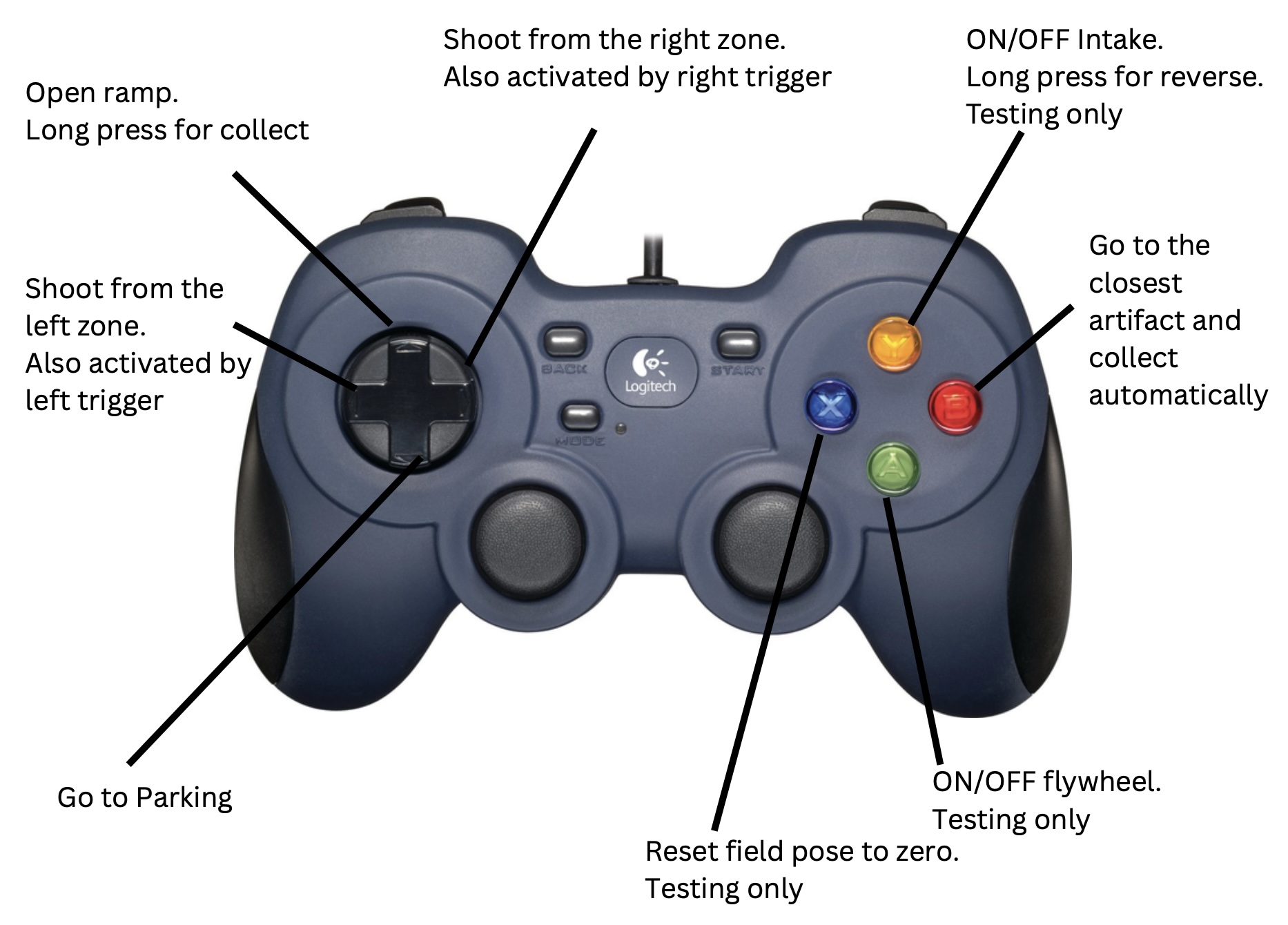
For TELEOP , optimizing throughput and achieving shorter loops requires as many driver automations as possible protecting the driver’s cognitive capacity for high-level decisions during the match.
Here’s the list of automations available to the driver during TELEOP:
- Indicate how many artifacts the robot currently controls using LEDs. Shut off the intake system after collecting 3 artifacts.
- Go to the near or far shooting zone at driver’s discretion via shortest route and immediately start shooting
- Naturally, the shooting process itself is automated even though it requires precise orchestration of different mechanisms.
- Actively hold shooting position/heading to counter opponent alliance’s defense play
- Go to the ramp lever and open the ramp and optionally collect artifacts rolling down, automatically. Thus, one of the fastest loops involving collecting from the ramp and shooting from the close zone can be achieved by pressing just two buttons on a gamepad without having to actually drive a robot.
- Go to the parking position. Last but not least, visually identify an artifact using a webcam and drive directly towards it and automatically collect.
Solving those during teleop required a software system capable of dynamically adjusting to an environment rather than just following an optimized plan, which is often what many teams do during the AUTO. To solve this, we have developed our own library based on the Kotlin programming language with heavy use of coroutines, which allows for easy composition of asynchronous code.
An additional layer of software complexity for the team to solve was a requirement to support at least two subsequent iterations of our robot design. To solve this, we decoupled the robot “interface” required for Decode season algorithms from robot implementation. This also allowed for unit testing to a certain extent. Furthermore we came up with all configuration parameters being stored in a per-robot config.properties file, which can be easily updated to a running robot via an HTTP API (similar to FTC Dashboard and Panels but doesn’t require copying and pasting through a user interface).
All of the BearPlatform library code as well as code for all our robot design iteration is open source and is available on GitHub for everyone to use. After season completion we plan to:
- Thoroughly review the APIs to make sure it can be conveniently used by anyone, not just us
- Update documentation to reflect the latest code version
- Add more unit tests
- Add more examples
- Set up build and version deployment process
- Set up a documentation website
- Write blog and Reddit posts for community awareness
- Assemble Kotlin and coroutines learning resources so that more team members could easily contribute